1) 핵심 원칙 (요약)
- 명확하게 쓰기 — 무엇(주제), 누가(대상), 어디서(배경), 언제(시간대), 어떻게(스타일/표현) 순으로 적는다.
- 구체성 — 색상(HEX 가능), 카메라 렌즈/조명, 구도, 해상도처럼 구체적일수록 원하는 결과에 가까워진다.
- 우선순위 표기 — 중요한 속성을 앞에 둔다. 모델은 앞쪽 단어를 더 신경 쓴다.
- 긍정지시 + 부정지시 — 원하는 것(positive prompt)과 **꼭 제외할 것(negative prompt)**을 함께 쓴다.
- 반복·개선 — 한 번에 완벽하려고 하지 말고, 작은 변경만으로 여러 번 생성해 비교한다.
- 모델별 문법 주의 — 일부 엔진은 가중치, 괄호, negative prompt 문법이 다르니 사용 툴 문서 확인.
2) 프롬프트 기본 템플릿 (모범형)
목적(무엇) + 주체(누가/무엇) + 스타일(화풍/매체) + 디테일(의상/색/표정 등) + 환경(배경/조명/시간) + 기술적 지시(구도, 렌즈, 해상도, 비율) + 출력 제약(투명배경/텍스트금지/파일비율)
예:
[무엇] + [주체] + [스타일] + [디테일] + [환경] + [카메라/구도] + [출력요청]
3) 사례별 — 원문(흐릿) → 개선(실전) 예시
사례 A — 포토리얼 인물 사진 (프로필)
- 원문(흐릿): 중년 남성 프로필 사진
- 개선(복사해서 사용):
- Korean man, mid-40s, professional headshot, natural smile, soft natural window light, shallow depth of field, 85mm portrait lens, f/1.8, even skin tone, subtle retouching, dark neutral background, ultra-detailed, high resolution, 4k, no watermark, no text.
- Negative prompt (제외): blurry, out of focus, extra limbs, watermark, text, lowres
사례 B — 전자상거래 제품 사진 (흰 배경)
- 원문: 신발 사진 흰 배경
- 개선:
- White leather sneakers (no visible brand logo), 3/4 angle, isolated on clean white background, soft shadow underneath, studio lighting, high detail texture of leather stitches, square 1:1 aspect ratio, 4000x4000 px, flat lay + slight perspective, no props, no text, no watermark.
사례 C — 판타지 캐릭터 컨셉
- 원문: 판타지 소녀
- 개선:
- Fantasy warrior woman, early 20s, long black hair, silver light armor with blue trims, holding a broad sword, dynamic battle pose, rim light from left, dark enchanted forest background, highly detailed digital painting, dramatic cinematic lighting, 3/4 body, color palette: cool blues and silvers, high-detail textures, 300dpi, "no text".
사례 D — 로고(심플·벡터 스타일)
주의: 대부분의 이미지 생성기는 래스터(PNG/JPG)만 출력. 벤치마크용 로고 컨셉 생성 후 벡터화 권장.
- 개선:
- Minimal vector-style logo concept for a café: circular badge, simple coffee cup silhouette, bold outline, single color #6B4F3E (brown), scalable design (easy to convert to SVG), flat design, no gradients, transparent background, output PNG 2048x2048, clean geometry, "no photorealism, no text".
사례 E — 풍경(드론/파노라마)
- 개선:
- Sunset over rocky coastline, golden hour, low sun near horizon, long exposures reflections on shallow water, wide panoramic 16:9, ultra-wide 14mm perspective, dramatic clouds, high dynamic range, cinematic, 8k, no people.
사례 F — 수채화 동화 일러스트
- 개선:
- Cute blue bird sitting on a branch, watercolor on textured paper, soft washes, minimal linework, warm pastel palette, hand-drawn feel, gentle shadow, A4 ratio, 'children's book illustration' style, no photorealism, no harsh edges.
사례 G — 앱 UI 목업 (하이파이)
- 개선:
- High-fidelity mobile app mockup: iPhone frame, Notes app home screen with title "여행 계획", three card list items (date, checklist, note), clean Material-style components, rounded 12px corners, spacing 16px, placeholder icons, realistic device shadow, PNG 2732x1170, include status bar, "no real brand names".
사례 H — 만화 3컷(스토리보드)
- 개선:
- Three-panel horizontal comic strip, college student couple in a café: panel1 greeting, panel2 small misunderstanding, panel3 resolution and smile; clean black line art, speech bubbles with placeholder text, simple backgrounds, print-ready CMYK 300dpi, clear panel borders.
4) 부가기술: negative prompt, weight, 파라미터
- Negative prompt 예시:(생성기마다 negative 입력 방식이 다름 — UI의 dedicated negative box가 있으면 거기에 넣자.)
- blurry, lowres, watermark, text, jpeg artifacts, extra fingers, mutated hands, deformed face, oversaturated
- 가중치 & 문법 팁:
- 일부 툴은 ()나 :1.2 같은 가중치 문법을 지원. 모델/툴 문법을 먼저 확인.
- 영어로 쓰면 더 풍부한 데이터셋에 의해 결과가 좋아질 확률이 있음 — 하지만 한국어로도 충분히 좋은 결과를 내는 툴이 많으니 실험해보자.
- 일반 파라미터(권장 범위):
- Steps: 20–60
- Guidance/CFG scale: 5–12
- Seed: 재현성이 필요하면 고정(숫자 입력)
- Aspect ratio: --ar 16:9 또는 1:1 등 (툴 문법에 따름)
(※ 구체 숫자는 사용하는 엔진에 따라 권장값이 다르니 툴 문서 참조)
5) 실전 팁 & 트릭
- 한 번에 하나만 바꿔라 — 변수 하나만 바꿔 비교해서 어떤 변화가 생기는지 학습하자.
- 우선순위 단어는 앞에 — 모델이 앞 단어에 더 민감하다. 핵심 속성(인물/사물/주제)은 맨 앞.
- 색상은 HEX로 지정하면 정확한 톤 제어가 가능하다. (#FF6B6B)
- 카메라/렌즈 지시: 85mm portrait, f/1.8 등은 인물의 배경 흐림 정도(보케)를 컨트롤.
- 구도 지시: close-up, full-body, 3/4 view, bird's-eye view 등.
- 감성단어 활용: melancholic, whimsical, cinematic 등으로 무드 조절.
- 참고이미지 업로드: 가능하면 레퍼런스 이미지를 함께 제공(색·포즈 등).
- 일관된 시리즈 만들기: 같은 seed + 같은 스타일 설명 + 다른 옷/표정으로 여러 이미지 생성.
- 문장보다는 콤마로 속성 나열 — 읽기 쉽고 모델에 잘 반영되는 경우가 많음.
- 텍스트 금지: 상업용 썸네일 등 텍스트 없는 이미지 필요 시 no text, no watermark 필수.
- 저작권·스타일 주의: 특정 생존 작가 스타일을 그대로 모사하는 요구는 일부 툴에서 제한될 수 있음. 대신 inspired by 90s anime처럼 스타일 묘사 사용.
6) 반복 워크플로우 (영상에서 보여주기 좋음)
- 아이디어 → 프롬프트 초안 (짧게)
- 생성 8~12장 (같은 프롬프트, 여러 seed)
- 선택 & 클리핑(좋은 것 2–3장 선택)
- 미세조정 프롬프트(선택 이미지에 대해 디테일 보강)
- 업스케일/인페인팅(부분 수정 필요하면 마스크로 보정)
- 포토샵/일러스트레이터로 최종 편집 (텍스트 삽입, 벡터화 등)
영상에선 이 과정을 타임랩스(예: 5초마다 한 단계)로 보여주면 이해가 빠름.
7) 자주 하는 실수 & 해결법
- 결과가 흐리다 → 해상도/steps 증가, high detail, ultra-detailed 추가
- 원치 않는 텍스트가 넣어짐 → no text, no watermark 명시
- 손/다리가 이상함 → realistic hands, five fingers, no extra limbs 추가
- 스타일 충돌 (예: ‘photorealistic watercolor’) → 둘 중 하나 선택하거나 photorealistic 대신 photo-like watercolor 등 모순 피하기
- 중복된 요소 → 구체적인 숫자 명시 (one subject, single character)
8) 바로 사용할 수 있는 프롬프트 예제 10개 (복사해서 실습)
- Professional headshot of a Korean woman, early 30s, soft window light, 85mm portrait lens, natural smile, neutral grey background, ultra-detailed, 4k, no watermark.
- White ceramic mug product shot, isolated on pure white background, subtle shadow, top-left studio light, square 1:1, high detail stitches, no props, no text.
- Elderly fisherman on a wooden boat at sunrise, cinematic film grain, warm color grading, wide angle, dramatic sky, 16:9, photorealistic.
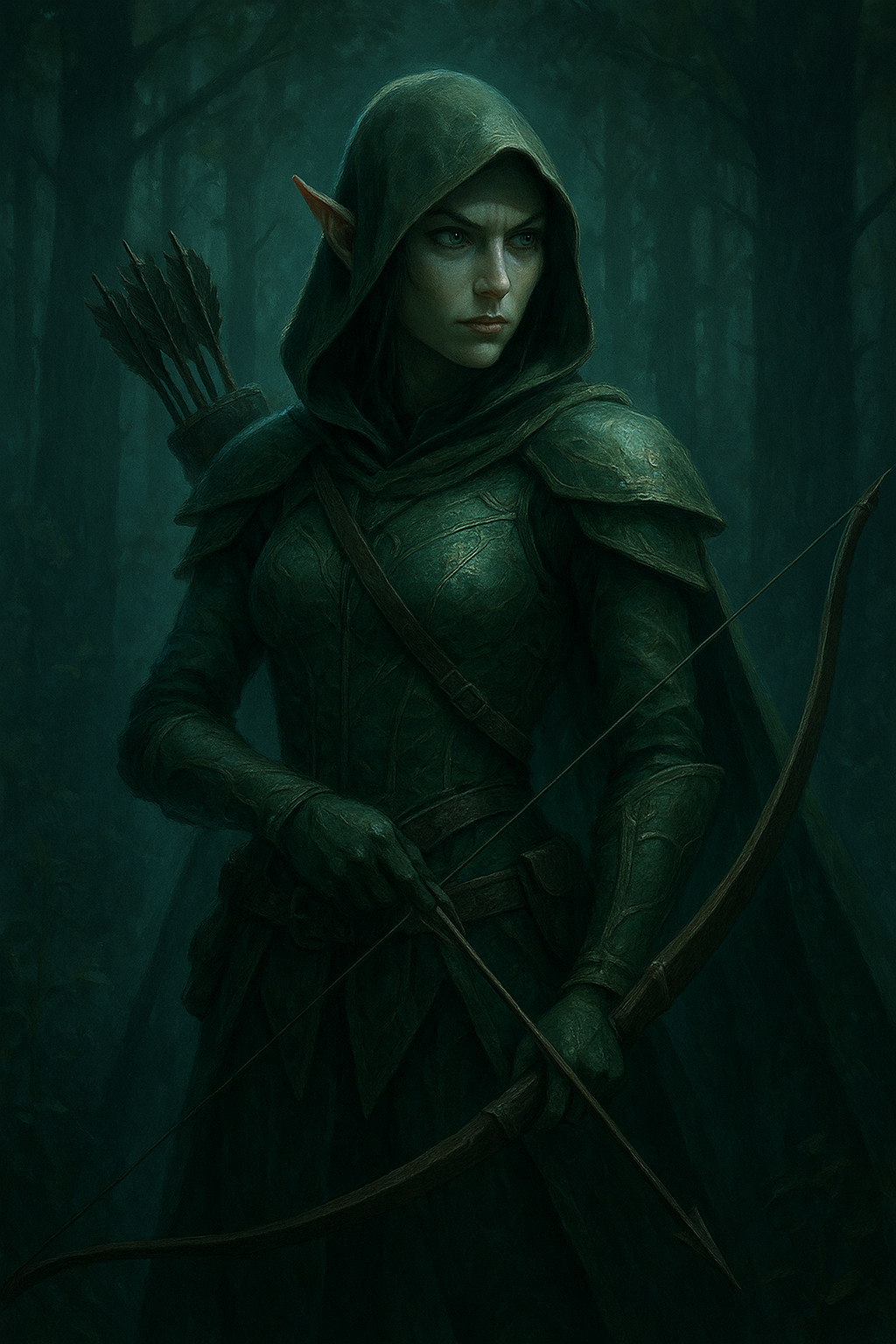
- Fantasy elf archer, green leather armor, hood up, holding longbow, forest background, rim light, detailed fantasy illustration, cold green palette.
- Minimal coffee shop logo concept: circular icon, stylized cup silhouette, flat vector look, color #6B4F3E, transparent background, clean geometry.
- Children's book style watercolor: small tiger cub under a banyan tree, soft washes, textured paper background, warm tones, simple composition.
- Mobile banking app screen mockup, modern clean UI, balance card at top, transaction list items, rounded corners, iPhone frame, high-fidelity.
- Aerial drone shot of a mountain lake in autumn, vivid reflection, golden trees, ultra-wide panoramic, cinematic, high dynamic range.
- Retro 80s synthwave album cover, neon pink and cyan, cyber city skyline, grainy texture, dramatic lighting, square format 1:1.
- Three-panel horizontal comic strip about a lost umbrella, simple black line art, clear speech bubbles, print-ready 300dpi.
9) 체크리스트 (생성 전에 빠르게 확인)
- 목적과 핵심 주제가 프롬프트 첫 문장에 있는가?
- 스타일/매체(사진, 수채화, 벡터 등) 명시했는가?
- 구도와 카메라(필요하다면) 적었는가?
- 색상/팔레트/HEX가 필요한 경우 기입했는가?
- 제외할 요소(텍스트, 워터마크 등)를 명시했는가?
- 출력 비율(가로세로)·해상도 지시했는가?
- 동일한 스타일로 여러 장 만들기 위한 seed나 고정 요소를 설정했는가?
'AI 활용' 카테고리의 다른 글
| [AI 활용] 생성형 AI를 아시나요? (2) | 2025.08.27 |
|---|
